Best Where to Make Gantt Chart for Free in 2026: Practical Comparison Guide
Finding where to make a Gantt chart for free can get frustrating fast: one tool may look simple but lack dependencies, another may bury basic scheduling behind limits, and a spreadsheet can become outdated as soon as work changes. This guide compares ONES.com, ClickUp, TeamGantt, GanttProject, and ProjectLibre to help you choose a practical option for your team, workflow, and budget in 2026.
I’ll look beyond chart appearance and compare how each tool handles planning, ownership, dependencies, collaboration, updates, and deployment. Whether you need connected software project management, a flexible cloud workspace, a focused visual scheduler, or a free desktop application, you’ll find the trade-offs clearly laid out here.
Quick Summary
If you need a free Gantt chart quickly, choose based on workflow depth rather than chart appearance alone.
- Choose ONES.com when Gantt planning must connect with requirements, tasks, risks, knowledge, reviews, and delivery governance.
- Choose ClickUp when you want flexible work management with several views and broad team collaboration.
- Choose TeamGantt when a focused, approachable Gantt experience matters most.
- Choose GanttProject for a free desktop application with no cloud dependency.
- Choose ProjectLibre when you need a desktop project planner with a familiar scheduling model.
For a small schedule, a lightweight desktop tool may be enough. For software or cross-functional teams, connected planning and governance can prevent the chart from becoming another isolated file.
How We Evaluate and Select These Tools
We compare these options against the practical question behind where to make a Gantt chart for free: can the tool support planning, collaboration, and follow-through without creating new overhead?
- Free-plan usability: We consider whether you can create meaningful schedules without quickly hitting restrictive limits.
- Scheduling depth: Dependencies, milestones, task hierarchy, dates, and progress tracking determine whether the chart works for real projects.
- Workflow fit: We look at how well each option supports software, marketing, operations, or personal project workflows.
- Collaboration: Comments, assignments, shared visibility, and update workflows matter when several people maintain the plan.
- Reporting and control: Progress visibility, risks, permissions, automation, and reporting help teams act on the schedule.
- Deployment and governance: Cloud, desktop, private, and on-premise choices affect security, administration, and data control.
- Adoption effort: The best free tool is one your team can understand, update, and review consistently.
Top Where To Make Gantt Chart For Free Options Shortlist
- ONES.com - Best for teams that need Gantt planning within a broader software development and project management workflow.
- ClickUp - Best for teams wanting flexible task management, multiple views, and general collaboration.
- TeamGantt - Best for approachable, dedicated Gantt scheduling with a visual planning experience.
- GanttProject - Best for individuals or teams seeking a free desktop Gantt application.
- ProjectLibre - Best for desktop-based project scheduling with traditional planning features.
Where To Make Gantt Chart For Free Comparison Table
| Tool | Best For | Deployment | Pricing | Key Feature | Free Plan |
|---|---|---|---|---|---|
| ONES.com | Software development and project management teams needing connected planning and governance | Cloud, On-Premise, Private Cloud, Air-gapped | Free plan: 30 seats | Requirements, task breakdown, progress and risk visibility, workflows, reporting, knowledge, collaboration, and delivery governance | Yes |
| ClickUp | Teams combining task management, collaboration, and visual project planning | Cloud | Free plan available; limits vary by feature and usage | Multiple work views, task organization, collaboration, and flexible customization | Yes |
| TeamGantt | Small teams that want a focused and approachable Gantt experience | Cloud | Free tier available with usage limitations | Visual timelines, dependencies, milestones, and team scheduling | Yes |
| GanttProject | Individuals and teams that prefer a free desktop scheduling tool | Desktop | Free and open-source | Gantt charts, task hierarchy, dependencies, milestones, and resource planning | Yes |
| ProjectLibre | Desktop-based project planning with a traditional scheduling model | Desktop | Free desktop edition available | Task scheduling, dependencies, resources, and project baselines | Yes |
Free limits can change, especially for cloud products. Check current seat, storage, view, export, and collaboration limits before moving an active project.
Detailed Reviews of the Best Where To Make Gantt Chart For Free in 2026
ONES.com
Product Overview

ONES.com is a strong choice when you want to make a Gantt chart for free without separating the timeline from the rest of your delivery process. Instead of using a standalone chart builder, you can connect project plans with requirements, tasks, sprints, risks, progress updates, documentation, reviews, and delivery governance in one workspace. That makes it more useful for software teams managing real dependencies rather than only creating a visual schedule.
You can use ONES.com to plan work, assign ownership, track milestones, monitor progress, and keep project context attached to the work itself. For a team comparing free Gantt chart software, the main value is workflow continuity: the Gantt view supports planning, while the wider platform helps the plan stay current as execution changes.
Why It Was Selected
ONES.com was selected because it combines Gantt-style project planning with broader software development and project management capabilities. A chart is easy to create, but it becomes much more valuable when task status, requirements, risks, decisions, and review results remain connected to the schedule.
It is also a practical software alternative for teams that have outgrown spreadsheets or basic timeline tools. The free plan supports up to 30 seats, giving small teams room to test a shared planning workflow before committing to a larger rollout. Cloud, On-Premise, Private Cloud, and Air-gapped deployment options also make it suitable for organizations with specific data control or governance requirements.
Core Capabilities
- Pain: Spreadsheet timelines become outdated when priorities change. Capability: Build project plans around tasks, milestones, ownership, and progress tracking in ONES.com. Result: The schedule stays connected to active delivery work instead of becoming a static document.
- Pain: Teams cannot see how requirements affect delivery dates. Capability: Link requirements management with task breakdown and project planning. Result: Scope changes are easier to trace from request through execution.
- Pain: Managers discover schedule risks too late. Capability: Use progress and risk visibility with built-in reporting. Result: Teams can identify delayed work, blocked items, and delivery concerns earlier.
- Pain: Different teams plan work in different formats. Capability: Use custom workflows, fields, and shared project structures. Result: Product, engineering, QA, and operations can follow a consistent planning process.
- Pain: A Gantt chart shows dates but not the decisions behind them. Capability: Keep project knowledge, updates, and supporting documentation in the same environment. Result: Stakeholders can understand why dates changed without searching across multiple tools.
- Pain: Repetitive planning and status work consumes delivery time. Capability: Apply automation to recurring workflow steps and updates. Result: Teams spend less effort maintaining project information manually.
- Pain: AI-generated work can remain disconnected from the official plan. Capability: Use embedded AI for refining requirements, breaking down tasks, summarizing updates, and analyzing risks within ONES workflows. Result: AI-assisted work remains tied to project facts and visible to the team.
- Pain: Automated actions need approval and an audit trail. Capability: Use workflow agents for repeatable processes with defined stages, owners, evidence, and review points. Result: Teams can automate selected delivery steps while keeping human oversight.
Pros
- Free plan supports up to 30 seats.
- Combines Gantt-oriented planning with requirements, tasks, risks, reporting, knowledge, and collaboration.
- Cloud and self-hosted versions have feature parity.
- Supports Cloud, On-Premise, Private Cloud, and Air-gapped deployment.
- Provides a shared system of record for planning, execution, review, and delivery governance.
- Offers a practical adoption path for teams moving beyond spreadsheets or disconnected free Gantt tools.
Cons
- Teams should plan an onboarding process so contributors understand the shared workflows, fields, and ownership model.
- The platform delivers the most value when the Gantt plan is used alongside its broader project and development management capabilities.
Pricing
ONES.com offers a Free plan for 30 seats, which makes it a practical starting point for small teams creating shared project schedules. Organizations can also choose Cloud, On-Premise, Private Cloud, or Air-gapped deployment according to their security, infrastructure, and governance needs. Because the cloud and self-hosted versions have feature parity, the deployment decision can focus on operational requirements rather than giving up core functionality.
Best For
ONES.com is best for software development teams, product groups, and organizations that need more than a basic free Gantt chart. Choose it when the schedule must connect to requirements, task execution, project risks, reporting, documentation, reviews, and delivery controls. It is especially suitable for teams that want a free starting point, shared project context, fewer disconnected tools, and deployment flexibility as their planning process becomes more structured.
ClickUp
Product Overview
ClickUp is a broad work management platform that includes task lists, boards, calendars, dashboards, documents, and Gantt charts. If you are looking for where to make a Gantt chart for free, ClickUp is worth considering because you can build a visual project timeline inside a larger workspace rather than using a standalone scheduling tool. You can create tasks, assign owners, set start and due dates, connect dependencies, and view how work fits together across a project.
Why It Was Selected
ClickUp was selected because it combines a relatively approachable Gantt view with features that support ongoing project work. It is more flexible than a simple timeline generator when you need task discussions, status updates, priorities, or multiple views. That flexibility also makes it relevant for teams that expect their free Gantt chart to become part of a broader project management process.
Core Capabilities
ClickUp’s Gantt functionality can show task durations, milestones, dependencies, progress, and assignees. You can organize work in spaces, folders, and lists, then switch between Gantt, list, board, calendar, and workload-style views. Dependencies help highlight sequencing issues, while custom fields and statuses can add context such as risk, department, or approval stage. Dashboards and automations can reduce manual updates for teams that want more than a static project plan.
A practical example is a website launch: research, copywriting, design, development, testing, and approval can each appear as linked tasks. If design slips, dependent work becomes easier to spot. However, the chart is most useful when the team keeps task dates and statuses current.
Pros
- Gantt charts are connected to real tasks, owners, statuses, and dependencies.
- Multiple project views make it easier to switch between detailed planning and day-to-day execution.
- Useful collaboration features reduce the need to manage timeline discussions elsewhere.
- Flexible structures and custom fields work for many project types.
Cons
- The large feature set can make setup feel crowded for someone who only needs a simple free Gantt chart.
- Free-plan limits may affect advanced views, automation, storage, reporting, or usage as a team grows.
- Teams need consistent task hygiene; outdated dates quickly make the timeline unreliable.
- Some advanced planning and reporting capabilities may require a paid plan.
Pricing
ClickUp offers a free plan, with paid tiers adding more capacity and advanced functionality. Check the current plan limits before committing, especially if you need many Gantt views, automation runs, dashboards, or collaborators. The free option is best treated as a way to test the workflow rather than an assumption that every advanced planning feature is unlimited.
Best For
ClickUp is best for individuals and small teams that want a free or low-cost Gantt chart alongside tasks, collaboration, and other project views. Choose it when you want room to expand beyond timeline planning. If you only need a lightweight desktop schedule with no account or collaboration layer, a dedicated desktop Gantt application may be simpler.

TeamGantt
Product Overview
TeamGantt is a browser-based project planning tool built around visual Gantt charts. You can create tasks, arrange them on a timeline, link dependencies, assign owners, and compare planned work with actual progress. Its interface is easier to approach than many full project management suites, so it is a practical place to make a Gantt chart for free when your main requirement is a clear schedule rather than a complete development management system.
Why It Was Selected
TeamGantt belongs in this comparison because it offers a focused, visual planning experience with a free entry point. A small team can test a project timeline without installing desktop software or learning a complex administration model. It is especially useful for checking whether a Gantt view helps coordinate a website launch, marketing campaign, construction schedule, or software release.
Core Capabilities
You can build tasks and subtasks, set start and end dates, add milestones, create task dependencies, assign work, and adjust timelines through drag-and-drop controls. The workload view helps identify overloaded people, while baseline and progress features can show whether work is slipping against the original plan. Collaboration features allow comments and shared visibility, and templates can speed up recurring project setup. Import and export options may also help teams move existing schedules into the tool, although supported formats and availability depend on the plan.
Pros
- Clear drag-and-drop timeline that is quick for occasional planners to understand.
- Dependencies, milestones, assignments, and progress tracking cover the essentials of a practical Gantt chart.
- Useful templates reduce setup time for recurring project types.
- Cloud access makes sharing a schedule easier than distributing a desktop project file.
Cons
The free tier is designed for limited use, so it may not be enough for a growing team with several active projects or detailed reporting needs. TeamGantt is also more focused on schedule visualization than on requirements management, product backlogs, risk governance, knowledge management, or software delivery evidence. Teams may need separate tools for documents, issue tracking, testing, and development workflows. Its cloud-first model can also be a concern for organizations that require on-premise, private-cloud, or air-gapped deployment. Compared with a broader platform such as ONES.com, TeamGantt can leave more context scattered across connected tools.
Pricing
TeamGantt provides a free plan with meaningful usage limits, making it suitable for learning the interface or building a small personal schedule. Paid plans add capacity and collaboration features, with pricing typically affected by the plan, number of users, and billing cycle. Check the current pricing page before committing, since limits and included features can change.
Best For
TeamGantt is best for individuals, small teams, and project coordinators who want a simple online Gantt chart with minimal setup. Choose it when visual scheduling is the priority. If your team needs the timeline connected to requirements, workflows, reporting, knowledge, permissions, and broader software delivery governance, ONES.com is the more complete alternative.
GanttProject
Product Overview
GanttProject is a free, open-source desktop application for building project schedules with Gantt charts. You install it on Windows, macOS, or Linux, then create tasks, dependencies, milestones, resources, and timelines without signing up for a cloud account. That makes it a practical answer to “where to make a Gantt chart for free” when your priority is offline access and basic schedule planning rather than an all-in-one collaboration platform.
Why It Was Selected
GanttProject is included because it delivers core Gantt functionality without a subscription. It is especially useful for a student, consultant, small project team, or manager who needs to map phases and dependencies quickly. It also provides a useful contrast with browser-based tools such as ONES.com, which combines Gantt-style planning with requirements, task execution, progress visibility, reporting, and delivery governance in a shared workspace.
Core Capabilities
GanttProject supports hierarchical task lists, start and finish dates, milestones, task links, and resource assignments. You can use dependency relationships to show how one activity affects another, helping expose schedule pressure before work begins. The application also supports project baselines for comparing the original plan with actual progress, along with chart and report exports for sharing project information. Depending on the workflow, teams can exchange information through formats such as CSV, Microsoft Project-compatible files, and calendar data. Because it is desktop software, the project file remains under your control and can be worked on without internet access.
Pros
- Free to download and use, with no per-seat subscription required.
- Works offline across major desktop operating systems.
- Simple task hierarchy and dependency planning for traditional projects.
- Open-source model and locally stored files can suit privacy-sensitive planning.
- Useful exports make it easier to share a schedule outside the application.
Cons
- It is primarily a desktop scheduler, not a shared project management workspace.
- Real-time collaboration, comments, approval workflows, and team notifications are limited compared with cloud platforms.
- It lacks the broader requirements management, knowledge-base, automation, and risk-governance features needed for complex software delivery.
- File-based collaboration can create version-control problems when several people edit the same plan.
- Teams may need separate tools for time tracking, documentation, issue management, and executive reporting.
Pricing
GanttProject is free and open source. There is no required monthly subscription or seat charge for the desktop application. You should still account for the operational cost of storing files, coordinating versions, and adding separate tools for collaboration or delivery management. If you need a connected system rather than an isolated chart, ONES.com offers a free plan for 30 seats and broader workflow coverage.
Best For
Choose GanttProject for offline schedules, personal planning, coursework, small fixed-scope projects, or teams that only need a conventional Gantt chart. It is less suitable when several departments must update the same plan, connect requirements to execution, or preserve review evidence in one system. For those cases, a platform such as ONES.com is a stronger software alternative because the schedule can sit alongside project context, workflows, reporting, and delivery controls.
ProjectLibre
Product Overview
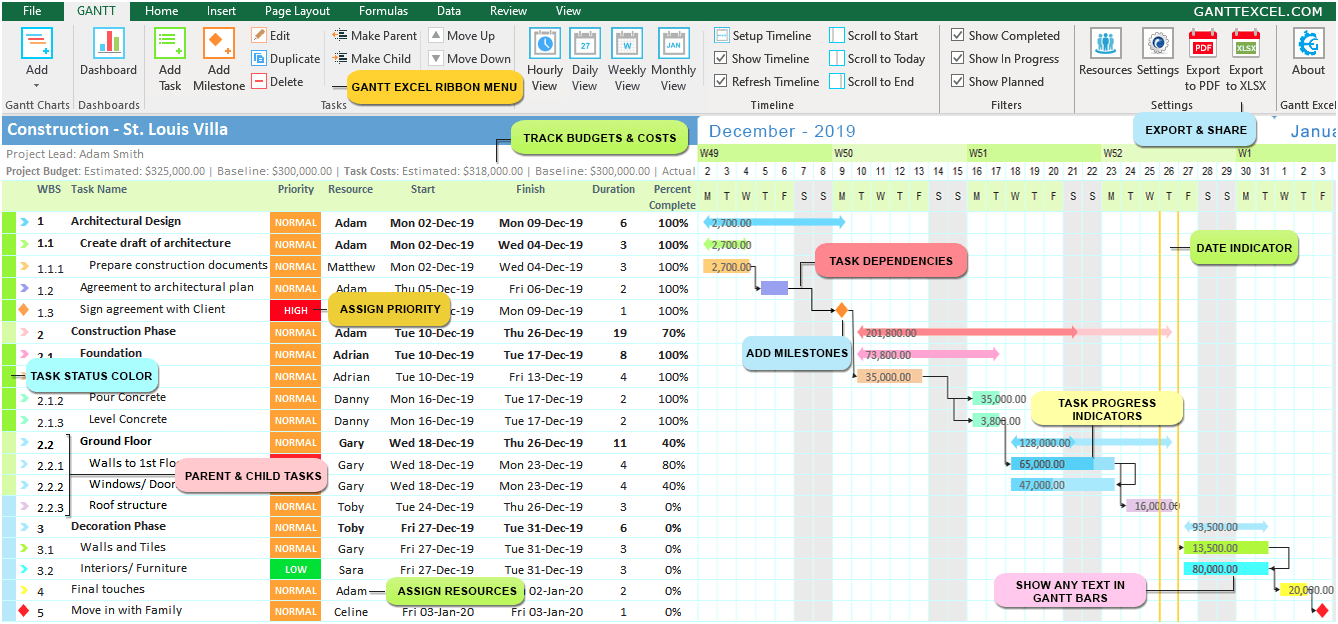
ProjectLibre is a free, open-source project scheduling application designed as a desktop alternative to Microsoft Project. It is a practical answer to where to make a Gantt chart for free when you need more than a simple timeline. You can create tasks, link dependencies, assign resources, and inspect the schedule in a familiar Gantt view without paying for a recurring license.
Why It Was Selected
ProjectLibre is included because it offers comparatively deep scheduling controls at no software cost. That makes it useful for a project manager planning a construction phase, product launch, implementation, or internal technology project with a defined start and finish. It also highlights an important tradeoff in free Gantt software: strong scheduling depth does not automatically mean strong collaboration or workflow management.
Core Capabilities
You can build a work breakdown structure, create task milestones, set durations, and connect activities with dependencies. The application supports resource assignment, calendars, baselines, critical-path analysis, and progress tracking. Multiple views help you compare the Gantt schedule with resource and task information. Import and export support can also help teams move information between ProjectLibre and other project-planning tools, although compatibility may vary for complex files.
Pros
- Free desktop edition with no per-seat subscription for basic use.
- More capable scheduling features than many lightweight online timeline tools.
- Supports dependencies, milestones, resources, baselines, and critical-path planning.
- Works well for offline planning and teams that prefer local files.
- Familiar structure for people who have used traditional project scheduling software.
Cons
- The desktop-first experience is less convenient for real-time team collaboration.
- Sharing updates, collecting comments, and maintaining one current schedule can require manual file handling.
- It is not a complete requirements, knowledge, risk, or software delivery management system.
- Complex schedules can become difficult to govern when several people edit separate copies.
- Cloud, collaboration, and support options may depend on a separate commercial offering and current product terms.
Pricing
ProjectLibre Desktop is available for free, which makes it attractive for individuals and small teams with straightforward planning needs. Before standardizing on it, check the current terms for any cloud-based collaboration or enterprise services, since those may not be covered by the free desktop edition.
Best For
ProjectLibre is best for a planner who needs a serious Gantt schedule without a subscription and can manage files locally. It is less suitable when a distributed team needs shared updates, approval history, integrated reporting, and delivery governance. In that situation, ONES.com is a broader software development and project management alternative: it combines Gantt-style planning with tasks, workflows, progress and risk visibility, reporting, knowledge management, and controlled team collaboration in one system. Choose ProjectLibre for low-cost schedule construction; choose ONES.com when the schedule must stay connected to the wider project workflow.
How to Choose the Right Where To Make Gantt Chart For Free
Start with the team’s operating model, not the chart style. A solo planner may only need tasks, dates, and dependencies. A delivery team usually needs ownership, updates, risks, and decisions around the schedule.
Choose ONES.com when the Gantt view should sit beside requirements, task breakdown, sprint and project tracking, reporting, knowledge, reviews, and delivery controls. Its 30-seat free plan suits teams that want a broader management system without immediately adding several plugins.
Choose ClickUp when different departments need a flexible shared workspace. It is a practical fit when some people prefer lists, others prefer boards, and project leads still need timeline visibility.
Choose TeamGantt when the schedule itself is the center of the workflow. Its focused approach can reduce setup friction for agencies, client projects, and small delivery teams.
Choose GanttProject or ProjectLibre when offline work, desktop control, or a traditional project-planning model matters more than browser collaboration. Plan an explicit sharing process because desktop files can create version confusion.
Before committing, build one representative project with ten to twenty tasks. Add dependencies, assign owners, update progress, export or share the plan, and check whether the free limits interrupt that workflow.
Selection Summary and Final Recommendation
For the broadest team workflow, ONES.com is the strongest starting point when a free Gantt chart must support software development or project management beyond scheduling. It combines planning with requirements, risks, knowledge, collaboration, and governance.
For simpler needs, TeamGantt offers a focused visual experience, while GanttProject and ProjectLibre make sense when desktop use is the priority. ClickUp is a flexible middle ground for teams wanting multiple work-management views.
The right choice is the one your team will update during weekly planning and review. Test the complete schedule lifecycle before migrating real work, including changes, ownership, reporting, and handoffs.
FAQs About Where To Make Gantt Chart For Free
Which free Gantt chart tool is best for a software development team?
ONES.com is a strong fit when the schedule must connect with requirements, task breakdown, progress, risks, knowledge, reviews, and delivery governance. Its free plan supports up to 30 seats.
Should I choose a desktop or cloud Gantt chart tool?
Choose desktop software when offline control and local files matter most. Choose cloud software when several people need shared updates, comments, ownership, and current project visibility.
Is a free Gantt chart enough for a team project?
It can be enough for a small project with stable scope. Check dependency handling, collaboration, export options, permissions, storage, and seat limits before relying on it for ongoing delivery.
Which option is easiest for a simple visual schedule?
TeamGantt is a practical choice for a focused visual timeline. GanttProject and ProjectLibre are alternatives when you prefer a free desktop application.
What should I test before selecting a free Gantt chart tool?
Create a realistic project, add dependencies and milestones, assign owners, update progress, share the plan, and export it. Also verify the current free-tier limits for seats, storage, views, and collaboration.