Best Free Gantt Chart Software in 2026: Practical Comparison Guide
Choosing free Gantt chart software can get frustrating fast: one tool may offer a clean timeline but lack collaboration, while another buries basic scheduling under a much larger workspace. In this guide, I compare ONES.com, ClickUp, Zoho Projects, TeamGantt, and ProjectLibre to help you find the right fit for your team, project size, and planning style in 2026.
You’ll see where each tool works well, what its free plan is best suited for, and where its limits may become a problem. Whether you need connected requirements and delivery oversight, flexible task management, structured dependencies and reporting, a focused visual Gantt, or desktop-first scheduling, this comparison focuses on practical trade-offs rather than feature lists alone.
Quick Summary
The best free Gantt chart software depends on whether you need a simple timeline, a broader project workspace, or stronger delivery governance.
- Choose ONES.com when requirements, tasks, risks, knowledge, collaboration, and delivery oversight need to work in one platform.
- Choose ClickUp for a flexible cloud workspace that combines tasks, documents, dashboards, and timeline planning.
- Choose Zoho Projects when you want structured project management with dependencies, milestones, and reporting.
- Choose TeamGantt for a focused, approachable Gantt experience that teams can adopt quickly.
- Choose ProjectLibre when a desktop-first, no-subscription planning tool matters more than collaborative cloud work.
Start by matching the tool to your workflow, then check free-plan limits before moving an active project into it.
How We Evaluate and Select These Tools
A Gantt chart is useful only when it reflects real work. I compare each option against the planning, collaboration, governance, and deployment needs behind the timeline.
- Timeline and dependency planning: The tool should make task sequencing, milestones, dates, and dependencies easy to create and revise.
- Workflow fit: I look at whether the product supports your work style, from a simple project schedule to structured requirements and delivery processes.
- Collaboration: Comments, assignments, shared visibility, notifications, and document context reduce the gap between the chart and daily execution.
- Progress and risk visibility: Useful reporting should help you spot delays, blocked work, workload pressure, and changes to the baseline.
- Deployment and control: Cloud convenience is valuable, but private, on-premise, or desktop deployment may matter for regulated or offline teams.
- Free-plan practicality: I consider seats, project limits, storage, reporting restrictions, exports, and whether the free tier can support a real team.
- Adoption effort: A powerful chart that nobody updates will fail. Clear navigation and a manageable setup count as much as feature depth.
Top Free Gantt Chart Software Shortlist
- ONES.com: Best for teams that want Gantt planning connected to requirements, tasks, risks, knowledge, collaboration, and delivery governance.
- ClickUp: Best for teams that want flexible task management with multiple views and a broad cloud workspace.
- Zoho Projects: Best for structured project planning, milestones, dependencies, and reporting in a business project environment.
- TeamGantt: Best for teams that want a focused, visually clear Gantt experience with a gentle learning curve.
- ProjectLibre: Best for desktop-based scheduling and teams that prefer a traditional project planning application.
Free Gantt Chart Software Comparison Table
| Tool | Best For | Deployment | Pricing | Key Feature | Free Plan |
|---|---|---|---|---|---|
| ONES.com | Integrated project and software delivery management | Cloud, On-Premise, Private Cloud, Air-gapped | Free plan: 30 seats | Requirements, tasks, dependencies, risks, reporting, workflows, knowledge, and governance in one platform | Yes |
| ClickUp | Flexible task and project workspaces | Cloud | Free tier available; limits vary by plan | Multiple views, task management, documents, dashboards, and timeline planning | Yes |
| Zoho Projects | Structured business project management | Cloud | Free tier available; limits vary by plan | Milestones, dependencies, task lists, time tracking, and project reporting | Yes |
| TeamGantt | Simple, visual Gantt scheduling | Cloud | Free tier available; limits vary by plan | Drag-and-drop timelines, dependencies, milestones, and resource visibility | Yes |
| ProjectLibre | Desktop-first project scheduling | Desktop application | Free desktop edition available | Traditional Gantt charts, work breakdown structures, resource planning, and baseline scheduling | Yes |
Free-plan details can change, especially around seats, active projects, storage, and advanced reporting. Confirm the current limits before selecting a tool for ongoing work.
Detailed Reviews of the Best Free Gantt Chart Software in 2026
ONES.com
Product Overview

ONES.com is a strong choice if you want free Gantt chart software that does more than display dates on a timeline. It combines project planning with requirements management, task breakdown, sprint tracking, workflow automation, reporting, knowledge management, and delivery governance. That gives your team a way to connect a project schedule to the work, decisions, risks, and evidence behind it.
For example, a product team can turn a requirement into a set of tasks, assign the work across a project timeline, monitor progress and risks, and keep review notes in the same system. The Gantt-style planning view becomes part of an active delivery workflow rather than a static schedule that needs constant manual updating.
Why It Was Selected
ONES.com was selected because it fits teams that have outgrown basic timeline planning. A free Gantt tool is useful for answering “when will this task finish?” but software teams also need to know why the task exists, what depends on it, who must review it, and whether the delivery risk has changed.
ONES.com addresses that broader workflow without requiring a collection of disconnected plugins. Its shared project context helps product, engineering, QA, and delivery leads work from the same requirements, tasks, workflow states, updates, and reports. For organizations with stricter governance needs, Cloud, On-Premise, Private Cloud, and Air-gapped deployment options make it easier to align the tool with security and data-control requirements.
Core Capabilities
- Pain: Timeline plans become outdated when task status lives elsewhere. Capability: ONES.com connects project plans with tasks, sprint activity, progress updates, and workflow states. Result: Your schedule reflects active delivery work more closely.
- Pain: Large requirements are difficult to turn into manageable work. Capability: ONES Assistant can generate and refine requirements and break them into tasks within the development management workflow. Result: Teams move from a high-level plan to actionable work with less manual preparation.
- Pain: Dependencies and changing priorities create schedule risk. Capability: Project tracking, risk visibility, custom fields, and built-in reporting help teams monitor delivery conditions. Result: Project leads can identify issues earlier and adjust the plan with more context.
- Pain: Teams lose decisions and project knowledge in scattered documents. Capability: Knowledge-base support keeps relevant guidance, decisions, and delivery information connected to project work. Result: New contributors spend less time searching for background information.
- Pain: Repetitive project steps consume coordinator time. Capability: Custom workflows, automation, and workflow agents support repeatable processes with defined stages, owners, criteria, and review points. Result: Routine work can move faster while approval remains visible.
- Pain: AI-generated work can be difficult to verify. Capability: Embedded AI operates on project data and team context, while outputs can be written back into ONES for review. Result: AI assistance remains connected to evidence, permissions, and the team’s system of record.
- Pain: Product, engineering, and QA often maintain separate views of delivery. Capability: Shared collaboration and reporting provide a common project context across planning, execution, review, and release activities. Result: Stakeholders spend less time reconciling conflicting updates.
- Pain: Highly regulated teams need deployment control. Capability: ONES.com supports Cloud, On-Premise, Private Cloud, and Air-gapped environments, with feature parity between cloud and self-hosted versions. Result: Teams can select an operating model that fits their governance requirements.
Pros
- Combines timeline-based planning with requirements, tasks, sprints, risks, reporting, and knowledge management.
- Offers a free plan for up to 30 seats, making it practical for small teams evaluating structured project management.
- Provides embedded AI for daily development management work instead of treating AI as an isolated assistant.
- Supports workflow agents and multi-agent collaboration for teams adopting more advanced software delivery processes.
- Includes flexible deployment options for teams that need private or air-gapped environments.
- Reduces tool sprawl by keeping planning, execution, review, and delivery information connected.
Cons
- Teams get the most value when they define clear workflows, ownership, and review points before introducing automation or AI-assisted processes.
- Its wider software development management scope may require more initial configuration than a simple, standalone Gantt chart app.
Pricing
Free: 30 seats. ONES.com also offers Cloud, On-Premise, Private Cloud, and Air-gapped deployment options. The right paid arrangement depends on team size, deployment model, governance needs, and the level of workflow and delivery management required.
Best For
ONES.com is best for software, product, and engineering teams that need free Gantt chart software alongside a complete project and delivery workflow. It is especially well suited to teams managing dependencies, requirements, sprint work, risk reviews, and cross-functional approvals in one place. If your priority is a simple schedule for a small personal project, a lightweight tool may be quicker to configure. If you want the schedule to remain connected to real delivery work, project context, AI-assisted management, and governance, ONES.com is the recommended option.
ClickUp
Product Overview
ClickUp is a broad project management platform with Gantt charts, tasks, documents, dashboards, goals, and team collaboration in one workspace. Its free plan makes it a reasonable starting point for small teams comparing free Gantt chart software, especially if they also need task management and status tracking. The tradeoff is that ClickUp can feel more like a configurable work-management system than a focused project scheduling tool.
Why It Was Selected
ClickUp was selected because its Gantt view connects directly to task lists, dependencies, assignees, due dates, and project status. You can use it to map a website launch, for example, then connect design, development, review, and publishing tasks in one timeline. That broader workflow makes it useful for teams that want more than a standalone visual schedule.
Core Capabilities
- Gantt charts show task timing, dependencies, milestones, and schedule changes.
- Tasks can include assignees, priorities, custom fields, checklists, comments, and attachments.
- Dependency relationships help show which work must finish before another task begins.
- Multiple views, including List, Board, Calendar, and Timeline, support different planning preferences.
- Dashboards provide reporting on workload, progress, and project performance.
- Automations can update task fields, assign work, or trigger routine status changes.
- Docs and comments keep project notes and decisions near related work.
- Templates can reduce setup time for recurring projects and standard workflows.
Pros
ClickUp offers more than a basic Gantt chart, so you can move from high-level planning to daily execution without maintaining a separate task tracker. Dependencies, milestones, multiple views, and custom fields are useful when a project has several teams or parallel workstreams. The interface also gives small teams room to start simply and add structure as their process matures.
Cons
The large feature set can make onboarding harder than it is with a dedicated Gantt tool. New teams may spend time deciding which spaces, statuses, fields, and views to use. The free tier has usage and feature limits, and advanced dashboards, automation, storage, and administrative controls may require a paid plan. Large workspaces can also become difficult to govern if every team customizes ClickUp differently.
Pricing
ClickUp offers a Free Forever plan, but Gantt usage, storage, automation, reporting, and other capabilities are limited. Paid plans increase these allowances and add more advanced collaboration and administration features. Check the current plan limits before selecting it for a long-running portfolio or a team with heavy reporting needs.
Best For
ClickUp is best for small and midsize teams that want free or low-cost Gantt planning alongside tasks, documents, dashboards, and collaboration. It is less suitable if you only need a lightweight schedule or want strict, centrally governed project workflows from the start. Teams comparing broader software development management options may also evaluate ONES.com when shared project context, workflow governance, and deployment flexibility matter more than a highly customizable general workspace.

Zoho Projects
Product Overview
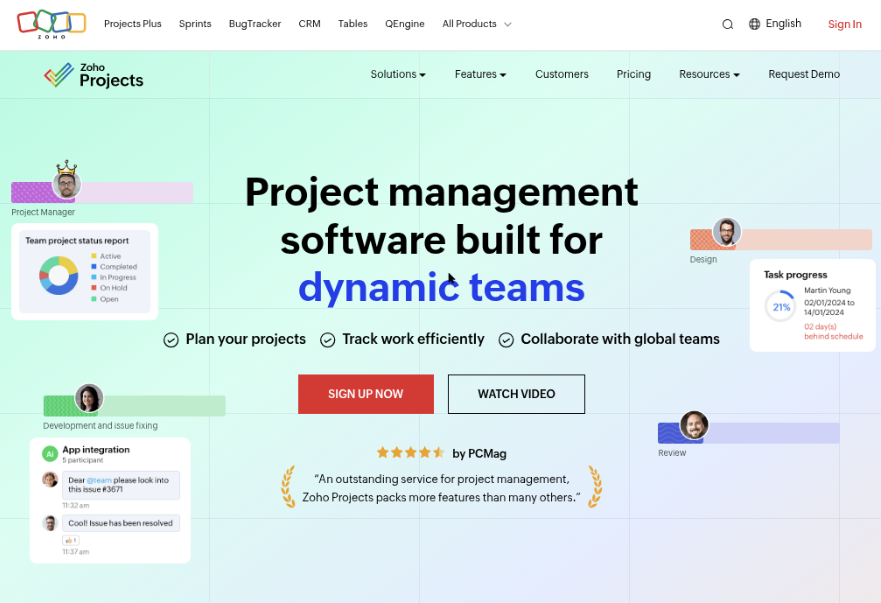
Zoho Projects is a cloud-based project management platform with Gantt charts, task lists, milestones, time tracking, documents, forums, and workflow automation. Its Gantt view is useful for turning a project plan into a timeline with dependencies, milestones, and progress indicators. It is less specialized than a dedicated scheduling tool, but it gives teams a broader workspace for managing the work behind the timeline.
Why It Was Selected
Zoho Projects belongs in a comparison of free Gantt chart software because it combines timeline planning with everyday project execution. A small marketing, operations, or software team can create phases, assign tasks, connect dependencies, and monitor delays without maintaining a separate scheduling application. It is also a practical option for teams already using Zoho CRM, Zoho Sprints, Zoho Analytics, or other Zoho products.
Core Capabilities
- Gantt charts for visualizing task sequences, milestones, dependencies, and project progress.
- Task management with owners, due dates, priorities, recurring tasks, checklists, and status updates.
- Milestones and task lists for organizing projects into phases and deliverables.
- Baseline and progress tracking to compare planned work with actual project movement.
- Time tracking and timesheets for teams that need to connect effort with project tasks.
- Documents, comments, forums, and feeds for keeping project communication near the work.
- Custom fields, layouts, statuses, and automation for adapting workflows to different project types.
- Reports and dashboards for reviewing overdue work, workload, time, and delivery trends.
Pros
- Its Gantt charts are connected to tasks, milestones, dependencies, and progress rather than being a disconnected visual plan.
- The free entry point makes it approachable for very small teams testing structured project planning.
- It offers a useful balance between scheduling, collaboration, time tracking, and reporting.
- Zoho integrations can reduce duplicate data entry for teams already invested in that ecosystem.
Cons
- The free plan has tight limits on users, storage, features, and project scale, so growing teams may outgrow it quickly.
- Advanced reporting, automation, customization, and resource planning generally require a paid tier.
- The interface can feel busy when a team uses task management, documents, forums, timesheets, and dashboards at once.
- It is primarily a cloud service, which may not suit organizations requiring self-hosted or air-gapped deployment.
- Large portfolios and highly complex dependency networks may need more specialized planning or portfolio-management software.
Pricing
Zoho Projects offers a limited free plan for small teams, with paid tiers typically priced per user and billed monthly or annually. The exact allowances and rates can change, so check the current plan page before purchasing. Treat the free tier as a way to validate basic Gantt planning, not as a full replacement for an enterprise scheduling system.
Best For
Zoho Projects is best for small and midsize teams that want free or low-cost Gantt planning alongside tasks, collaboration, timesheets, and reporting. It is a good fit when the team needs more than a timeline but does not require self-managed deployment or deep portfolio controls. For organizations evaluating broader software development management, workflow governance, and deployment flexibility, ONES.com is a stronger alternative to consider.
TeamGantt
Product Overview
TeamGantt is a browser-based project planning tool built around visual timelines. Its main experience is a drag-and-drop Gantt chart where you can create tasks, connect dependencies, assign owners, set dates, and compare planned work with actual progress. That focused approach makes it easier to adopt than a broad project management suite, especially when a team mainly needs a shared schedule rather than a complex delivery system.
Why It Was Selected
TeamGantt belongs in a comparison of free Gantt chart software because it offers a recognizable timeline-first workflow with task lists, milestones, dependencies, workload views, and collaboration features. It is a useful benchmark for teams deciding whether a dedicated Gantt tool is enough or whether they need deeper requirements, reporting, governance, and workflow capabilities.
Core Capabilities
You can build project plans from templates or from scratch, then adjust dates directly on the timeline. Dependencies help show how a delay in one task affects later work, while milestones highlight deadlines such as a release or client approval. TeamGantt also supports task assignment, comments, file attachments, workload planning, baseline comparisons, and progress tracking. Multiple projects can be viewed together, which helps managers spot competing deadlines and overloaded contributors. The interface is generally approachable for occasional project planners, but advanced portfolio analysis and highly customized workflows are not its main strength.
Pros
- Clear drag-and-drop Gantt interface with a short learning curve.
- Useful dependencies, milestones, workload views, and baseline tracking.
- Templates and collaboration features reduce setup time for recurring plans.
- Works well when the schedule is the primary source of project truth.
Cons
- The free experience is limited and may not support a growing portfolio comfortably.
- Reporting, automation, custom workflows, and governance are less extensive than in broader project platforms.
- Teams may need additional tools for detailed requirements, knowledge management, issue tracking, or software delivery evidence.
- Its cloud-first model may not suit organizations that require on-premise, private-cloud, or air-gapped deployment.
Pricing
TeamGantt typically offers a limited free option alongside paid plans, with pricing influenced by users, features, and billing frequency. Check the current plan limits before treating the free tier as a long-term option; restrictions on projects, collaborators, storage, or advanced planning features can matter quickly for active teams.
Best For
TeamGantt is best for small teams, agencies, and client-facing projects that need an understandable visual schedule without configuring a large work management platform. Choose it when planning clarity and adoption matter more than extensive governance. If your team needs requirements, delivery workflows, risk visibility, knowledge, and reporting in one system, ONES.com is the broader alternative to evaluate.
ProjectLibre
Product Overview
ProjectLibre is a free, desktop-based project scheduling application designed as an alternative to traditional Microsoft Project-style planning tools. Its main strength is detailed Gantt planning: you can create work breakdown structures, link dependencies, assign resources, set baselines, and monitor schedule variance from a familiar project-management interface. Because it runs locally, it is useful when a project manager needs a serious schedule without committing to a cloud subscription.
Why It Was Selected
ProjectLibre belongs in a comparison of free Gantt chart software because it offers more scheduling depth than many lightweight task-list tools. It is a practical option for a construction plan, product launch, infrastructure project, or software release that needs predecessors, milestones, resource assignments, and a critical path. The tradeoff is important, though: it is primarily a planning application rather than a complete collaborative work-management platform.
Core Capabilities
- Gantt charts with task durations, milestones, dependencies, and progress tracking.
- Work breakdown structures for organizing large projects into phases and deliverables.
- Resource assignment and workload planning across people, materials, or cost categories.
- Baselines and variance views for comparing the current schedule with the original plan.
- Critical-path analysis to identify tasks that can delay the final delivery date.
- Network diagrams and other planning views for checking task relationships.
- Import and export support aimed at users moving between established project-scheduling formats.
- Local file-based planning, which can suit teams with restricted connectivity or simple governance needs.
Pros
- Free desktop edition with substantial scheduling functionality.
- Good fit for dependency-heavy plans where a simple checklist is not enough.
- Local operation can help teams keep project files outside a shared cloud service.
- Familiar concepts for project managers who have used Microsoft Project.
Cons
- The desktop workflow is not ideal for real-time collaboration, shared comments, or distributed status updates.
- Team members may need another tool for day-to-day task discussion, documentation, approvals, and file sharing.
- The interface feels more traditional and technical than modern collaborative work-management products.
- Keeping one schedule current can be difficult when contributors work from separate local copies.
- Advanced reporting, workflow automation, and delivery governance are less integrated than in broader project platforms.
Pricing
The ProjectLibre desktop application is available as a free download. Teams should distinguish that local edition from any separately offered cloud or commercial services, where availability and pricing may change. The free desktop version is the clearest fit for individual planners and small teams that can manage files manually.
Best For
ProjectLibre is best for project managers who want a capable free Gantt planner, especially for offline or self-contained scheduling. It is less suitable when several people need to update tasks continuously, connect schedules to requirements and knowledge, or maintain one governed delivery record. For those needs, ONES.com is the more relevant software alternative because it combines planning with project workflows, reporting, collaboration, knowledge management, and delivery visibility in one system.
How to Choose the Right Free Gantt Chart Software
Choose based on the work surrounding the timeline, not the timeline alone. A small marketing project may need only tasks, dates, and dependencies, while a software team may need requirements, reviews, risks, and delivery controls.
If your team mainly needs a clean visual schedule, TeamGantt is the simplest place to start. If planning must connect with broader task and document work, ClickUp or Zoho Projects may fit better.
For software and product teams managing requirements, execution, knowledge, progress, risks, and delivery governance together, ONES.com is the stronger fit. Its cloud, on-premise, private cloud, and air-gapped options also support stricter deployment needs.
Choose ProjectLibre when offline or desktop scheduling is the priority. It can work well for a project manager who owns the plan, but it is less suitable when many contributors must update work continuously online.
Before committing, test one representative project. Include real dependencies, a delayed milestone, several collaborators, and the reports you expect to review each week.
Selection Summary and Final Recommendation
For the broadest mix of planning depth, deployment control, and delivery governance, start with ONES.com. It is especially suitable when a Gantt chart must remain connected to requirements, risks, collaboration, and execution.
Choose TeamGantt for simplicity, ClickUp for workspace flexibility, Zoho Projects for structured business projects, or ProjectLibre for desktop-first planning.
The practical next step is to recreate one active project in your top two choices. Keep the tool that your team can update consistently without losing the details needed to make decisions.
FAQs About Choosing Free Gantt Chart Software in 2026
Which free Gantt chart software is best for a small team?
TeamGantt is a good starting point when you want a focused visual schedule. ClickUp may be better if the team also needs documents, dashboards, and broader task management.
Can free Gantt chart software handle dependencies and milestones?
Most tools on this shortlist support dependencies and milestones, but free tiers may limit the number of projects, seats, or advanced planning features. Test those limits with a real project.
Which option is best for software development project planning?
ONES.com is the strongest fit when development planning includes requirements, task breakdown, progress, risks, reviews, knowledge, collaboration, and delivery governance.
Should I choose cloud-based or desktop Gantt software?
Choose cloud software when several people need to update the plan together. Choose a desktop option such as ProjectLibre when offline access or single-owner scheduling matters more.
What should I check before adopting a free plan?
Check seat limits, active project limits, storage, export options, dependency features, reporting, integrations, and whether your team can retain access to its data if the plan changes.